CLEANPAD GUIDE · AIRBNB
Airbnb cleaning checklistA checklist that ends in a decision,
not just a row of ticks.
Most Airbnb cleaning checklists stop at “clean the bathroom”. The expensive mistakes happen after that: a missing towel, a slow drain nobody reported, a host who assumes a full set of ticks means the place is ready. This checklist keeps those three things apart.
What makes an Airbnb checklist different from a house-cleaning list
A home cleaner works for the person who lives there. An Airbnb cleaner works for someone who is not in the room and a guest who has not arrived yet. That changes what the list has to carry:
- A defined minimum of supplies. Airbnb’s Essentials amenity is toilet paper, soap for hands and body, one towel per guest, one pillow per guest and linens for each guest bed (Airbnb Help Center). If the listing ticks Essentials, the checklist has to prove those are there, every time.
- A known starting state. From 20 November 2026 Airbnb tells hosts that guests should not be asked to wash and put away dishes, strip the beds, start laundry or take rubbish off-site; hosts may ask for dishes in the sink, used towels gathered and rubbish sorted into indoor bins (Airbnb, 20 October 2026). So the checklist should assume every bed needs stripping and every dish needs washing.
- An exception log. Things the cleaner cannot fix during the clean (a slow drain, a chipped glass, a guest’s charger) need an owner and a follow-up, not a ticked box.
- A handoff decision. Somebody has to say “ready for the next guest”. That is a different act from finishing the tasks.
The room-by-room checklist
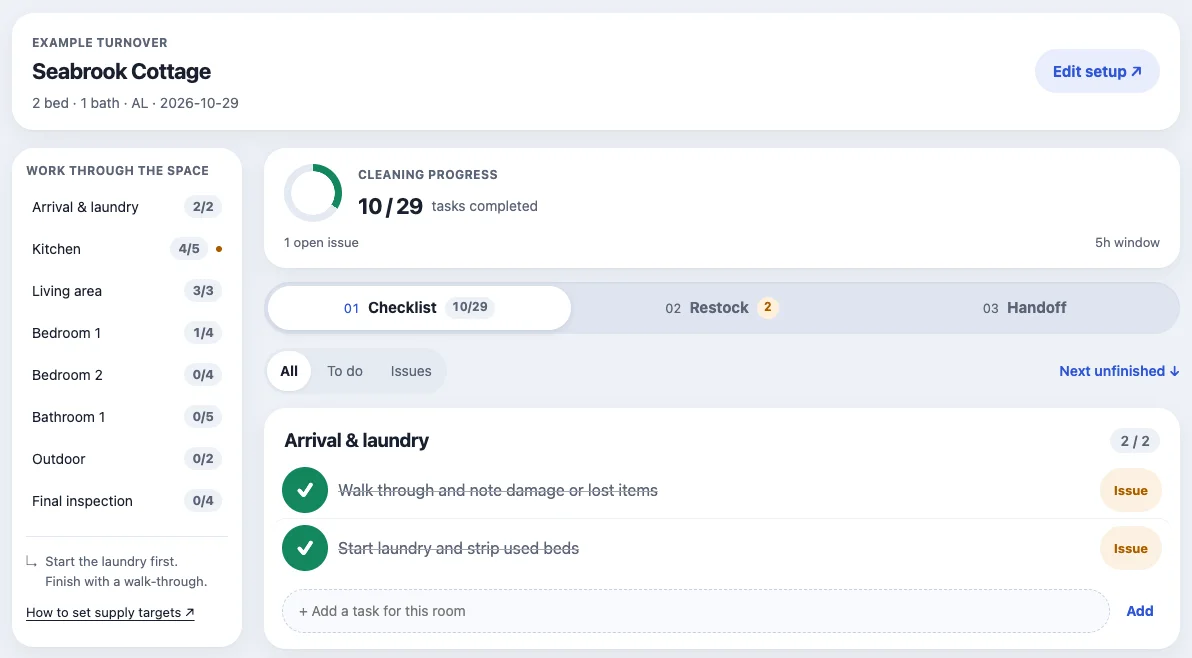
These are the default tasks in the Cleanpad workspace for a property with bedrooms, bathrooms and an outdoor area. The right-hand column is why the line is on an Airbnb list rather than a generic one.
| Room | Task | Why it is here |
|---|---|---|
| Arrival | Walk through and note damage or lost items | Before anything is moved. This is the record a damage claim relies on. |
| Arrival | Start laundry and strip used beds | Laundry is the longest-running job, and from November 2026 guests should not be asked to strip beds. |
| Kitchen | Wash dishes and clean sink | Guests may be asked to leave dishes in the sink, not to wash them. |
| Kitchen | Wipe counters, handles and appliance fronts | High-touch surfaces. The CDC advises cleaning them after visitors. |
| Kitchen | Check fridge for left-behind food | The next guest finds it first. |
| Kitchen | Restock dish soap and bin liners | Counted on the restock tab, not guessed. |
| Living area | Dust surfaces and screens · Vacuum seating, rugs and floors · Reset cushions and remotes | Resetting to the listing photos is part of “accurate”. |
| Each bedroom | Fit fresh sheets and pillowcases · Clean nightstands and mirrors · Vacuum floor and check drawers | Linens for each guest bed and one pillow per guest are part of Essentials. Drawers hide left items. |
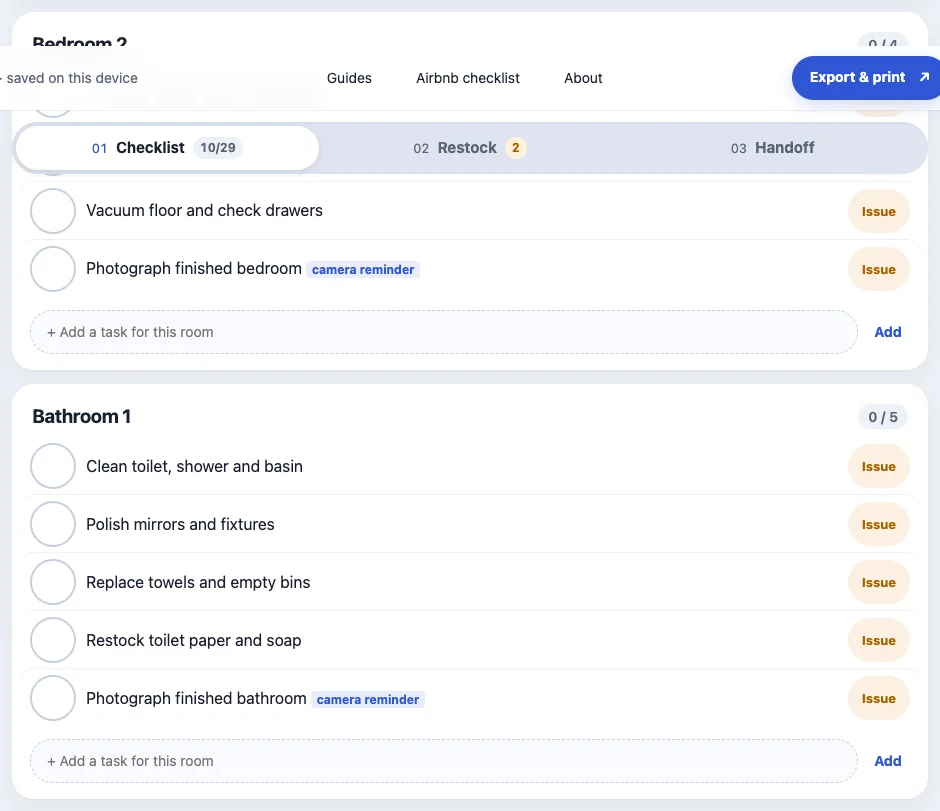
| Each bathroom | Clean toilet, shower and basin · Polish mirrors and fixtures · Replace towels and empty bins · Restock toilet paper and soap | Three of the five Essentials live here. |
| Outdoor | Sweep entry and patio · Check outdoor furniture and bins | The arrival view; bins often need to go out on a collection day. |
| Final inspection | Check windows and doors are secure · Set thermostat and welcome lighting · Confirm supplies and keys are ready | The last pass, done as a review rather than more cleaning. |
Each bedroom and bathroom gets its own block. A two-bedroom listing has two “fit fresh sheets” lines, so “bedroom done” cannot hide a bed that was missed. Optional blocks add pet checks, deep-clean tasks and guest-ready checks (Wi-Fi, door code, smoke and CO alarm test, hot water, batteries, a smell check from the front door). Every room also takes your own tasks: the coffee machine, the hot tub cover, the key safe.
Tick, flag or leave open
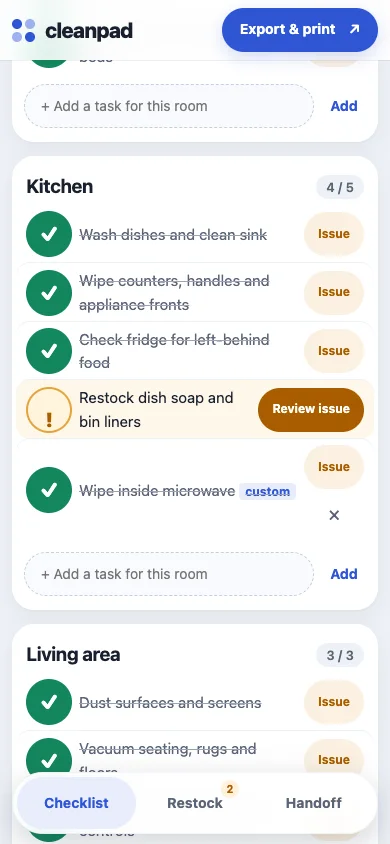
Each line has three honest states. Ticked means done. Issue means done as far as possible but something needs attention: write what it is, mark whether it blocks the handoff, and name who is responsible. Untouched means not done. A ticked task cannot quietly close an open issue on the same line; the issue has to be marked fixed and then verified by someone. That is the difference between a checklist and a log.
When a guest reports something after check-in, the useful question is whether it was known at the turnover. A list of ticks cannot answer that. An issue with an owner and a time can.
Supplies are counted, not eyeballed
The restock tab compares a target with what is actually on the shelf: bring = target − on hand, never below zero, and a blank count stays “not counted”. Mark the Essentials items as essential and a shortage blocks the handoff instead of disappearing into a note. The Airbnb Essentials guide turns Airbnb’s per-guest wording into targets you can type in.
Finish with a separate review
The handoff tab collects everything that is not clean yet: blocking issues, issues to review, essential shortages, unchecked tasks. Only when that list is clear can a host record a confirmation with a name and a time, and any later edit voids it. On a same-day turnover this is the screen the host reads before telling the next guest the door code. The final inspection guide covers the walk-through itself.
Printable, phone or both
Some cleaners want paper. Download the blank one-bedroom, one-bathroom PDF, or set the real room count in the workspace and use Export & print → Print blank checklist. On a phone the same checklist has large tick targets, a Next unfinished shortcut and the three tabs at the bottom of the screen. Everything is saved in the browser on that device; there is no account and nothing is uploaded. Export a CSV for a spreadsheet or a JSON backup to move the record.
Open the free Airbnb checklist →
Sources
- Providing essential amenities for guests, Airbnb Help Center. Read 29 October 2026.
- Important changes to house rules (20 October 2026), Airbnb Resource Center. Read 29 October 2026.
- When and How to Clean and Disinfect Your Home (31 January 2025), U.S. Centers for Disease Control and Prevention. Read 29 October 2026.
Workspace behaviour is described from the Cleanpad code and the screenshots above, taken on the built-in example turnover. Cleanpad is not affiliated with Airbnb.
Updated 29 October 2026